
Cookie consent and privacy requirements are something website owners cannot simply ignore.
But for a small business, managing these requirements can easily lead to another plugin, another subscription and another ongoing website cost.
When we reviewed cookie consent on the WEB-KNACK website in September 2026, we wanted to find out whether we actually needed to add another paid service or whether a free WordPress solution could provide the functionality our website required.
That led us to Complianz Free.
Installing it was the easy part.
The more important question was whether the resulting setup actually worked.
What started as a relatively straightforward job developed into reviewing detected cookies, configuring Google Analytics 4 (GA4), examining an existing Google Tag Manager (GTM) implementation, clearing historical browser data and using Chrome DevTools to see what the website was actually doing.
One finding stood out:
A visible cookie banner does not prove that analytics or other non-essential technologies are being controlled as intended.
At one stage, our consent interface appeared to be working correctly. But Google Analytics cookies were already present before the visitor had accepted Statistics.
We eventually simplified the architecture to WordPress, Elementor, Complianz Free and GA4, with Complianz controlling our direct Analytics implementation according to the visitor’s Statistics choice.
Then we tested it again.
Before consent, the GA4 _ga cookies were absent. After accepting Statistics, they appeared.
This guide explains how we reached that configuration, what went wrong along the way, what changed in UK cookie guidance in 2026 and how to test your own WordPress website rather than assuming a banner works because you can see it.
Why does cookie consent actually matter?
A cookie banner is not just something to add to a website to make it look compliant.
What matters is what the website actually does before a visitor makes a choice. Under PECR, website operators generally need to provide clear information and obtain prior consent before using storage and access technologies, unless a specific exception applies. These rules can cover cookies as well as technologies such as scripts, tags, tracking pixels and web storage.
There are exceptions, including for technologies that are strictly necessary and, subject to specific conditions, some statistical purposes. However, those exceptions are purpose-specific and should not simply be assumed to apply.
This means a website can display a professional-looking cookie banner while tracking is already taking place in the background. The ICO specifically states that non-exempt storage and access technologies must not be pre-enabled before the required consent has been obtained.
Getting this wrong can also have regulatory consequences. More importantly for everyday website owners, it means the consent mechanism may not be doing the job they believe it is doing.
That is why we were not satisfied simply because a cookie banner appeared on the WEB-KNACK website. We wanted to test what the browser was actually doing before and after consent.
Source: Guidance on the use of storage and access technologies
The short answer: what should WordPress cookie consent actually do?
Effective WordPress cookie consent should do more than display a banner. It should identify relevant storage and third-party technologies, provide appropriate information and controls, apply the website’s chosen consent or exemption approach, respect visitors’ choices and be tested in the browser to confirm that analytics and other technologies behave as intended.
In practice, check four things:
- What technologies the website uses.
- Why each technology is being used.
- Whether consent or a relevant UK exception applies to that purpose.
- Whether the website actually behaves according to the approach you’ve chosen.
A banner is the visible part.
The important technical behaviour often happens behind it.
In our WEB-KNACK test, the banner looked correct before the underlying Analytics implementation was correct.
Quick insight
During WEB-KNACK’s September 2026 implementation, we tested cookie consent on one WordPress website using Elementor, Elementor Pro, LiteSpeed Cache and GA4.
Our first clean-browser test exposed a problem: GA4 cookies appeared before the intended Statistics consent because Analytics was still loading independently through Google Tag Manager.
We removed that duplicate route and allowed Complianz to manage the direct GA4 implementation. In the final test, _ga cookies were absent before consent and appeared after Statistics was accepted.
This is a first-party case study of one website and one configuration. It is not a controlled comparison of every WordPress consent platform.
Methodology and scope
This article is based on work carried out on the WEB-KNACK website in September 2026.
The environment included:
- WordPress.
- Elementor and Elementor Pro.
- LiteSpeed Cache.
- Google Analytics 4.
- An existing Google Tag Manager implementation.
- Complianz Free in the final configuration.
We considered more than one consent-management approach before choosing the final setup.
Testing included reviewing the existing GTM configuration and installation code, clearing stored site data, opening clean logged-out browser sessions and comparing browser cookie behaviour before and after the relevant consent interaction.
This was not a controlled performance benchmark between consent plugins.
Results concerning scanning, configuration and browser behaviour describe the WEB-KNACK installation we tested. They should not be treated as universal results for every WordPress website.
This article documents technical implementation and testing. It is not legal advice and copying a particular plugin configuration does not by itself establish compliance with PECR, UK GDPR or other applicable law.
Why a cookie banner is not the same as consent working
It helps to separate the implementation into four parts.
1. The banner
The banner is the visitor-facing interface.
It might contain Accept, Deny and View Preferences, together with information about how the website uses cookies and similar technologies.
That’s the part everybody sees.
2. The visitor's choice
Where a choice is required, the website needs to recognise it.
One visitor might accept Statistics while another declines. A more complex website might have separate purposes covering statistics, advertising and additional functionality.
Where consent is required, the mechanism needs to give the visitor genuine control over the relevant purposes.
3. What the website actually loads
This is where things become more technical.
Analytics, advertising platforms, embedded videos, maps, CAPTCHA services and other integrations can involve scripts, network requests, cookies or other storage and access technologies.
Installing a consent plugin does not necessarily place every independently installed script under that plugin’s control.
Imagine that a consent plugin is configured to control Analytics, but somebody previously inserted another Analytics script into the website header.
The banner can look right while the independent script keeps loading.
That’s broadly what we uncovered on WEB-KNACK.
4. Verification
The final layer is testing.
Instead of stopping when the banner looks right, test what happens:
- Before making a choice.
- After denying.
- After accepting.
- After changing a previous preference.
That distinction matters.
There is a big difference between “we installed a cookie banner” and “we tested what the website actually does.”
What UK small businesses need to understand about cookies and analytics in 2026
UK guidance changed materially in 2026.
On 29 April 2026, the Information Commissioner’s Office (ICO) finalised updated guidance on storage and access technologies. The guidance incorporates changes introduced by the Data (Use and Access) Act.
The rules are not concerned only with conventional browser cookies. The ICO’s guidance covers storage and access technologies including cookies, tracking pixels, device fingerprinting and similar technologies.
There are now five exceptions to the general PECR prohibition on storing or accessing information on a person’s device where the requirements of the relevant exception are satisfied.
These cover communication, strictly necessary purposes, statistical purposes, appearance and emergency assistance.
Source: Guidance on the use of storage and access technologies
Strictly necessary technologies
The strictly necessary exception can apply where storage or access is essential to provide the service the user requested.
The important word is necessary.
According to the ICO, the assessment should be made from the user’s perspective. Something does not become strictly necessary simply because the website owner finds it useful.
Source: What are the exceptions?
The statistical purposes exception
One particularly important 2026 change concerns website analytics.
It is no longer sufficiently accurate to say that all website analytics always requires prior consent under PECR.
The statistical purposes exception can apply when the sole purpose of the storage or access is collecting statistical information about how a website or service is used, with a view to improving it.
The ICO gives examples including visits, pages accessed, user journeys, device and browser information and other aggregate information about how a service is used.
But this is a narrow exception.
It is not a blanket exemption for anything labelled “analytics”.
Among the requirements, users must receive clear and comprehensive information and have a simple, free means of objecting.
The ICO also makes clear that the exception concerns statistical information about use of the service. It is not intended for identifying, tracking or profiling individual visitors and it does not extend to online-advertising purposes.
Where an implementation goes beyond the exception’s requirements, consent may still be required.
Source: What are the exceptions?
So the practical question isn’t simply:
“Is this an analytics cookie?”
It’s:
“What exactly is this technology doing, why is it doing it, what happens to the resulting information and does this implementation satisfy the requirements of the exception?”
Why WEB-KNACK still uses a consent-based GA4 configuration
For the implementation documented here, WEB-KNACK chose a straightforward consent-based approach to GA4 rather than attempting to rely on the statistical purposes exception.
Our intended behaviour is simple:
Before Statistics is accepted – our normal GA4 implementation is withheld.
After Statistics is accepted – GA4 can load.
That also gives us a relatively straightforward behaviour to test.
A note about Google Consent Mode
Google formally distinguishes between Basic Consent Mode and Advanced Consent Mode.
Under Google’s Basic Consent Mode, Google tags are prevented from loading until the visitor interacts with the consent mechanism. If consent is not granted, Google says no data is transferred.
Under Advanced Consent Mode, Google tags load with consent defaults and can send cookieless pings while consent is denied.
Source: Google – About Consent Mode
Our final Complianz configuration had Google Consent Mode V2 disabled.
We therefore describe the WEB-KNACK implementation in this article as a basic blocking approach, not as Google’s formal Basic Consent Mode implementation.
That distinction matters. The two concepts are related, but they are not identical.
What we wanted from a WordPress cookie-consent solution
Once we understood that the banner was only part of the job, the selection criteria became clearer.
We needed a solution that could support our GA4 implementation, work sensibly with WordPress and Elementor, provide visibility over detected services, remain maintainable and give us a configuration we could verify ourselves.
Cost structure mattered too, particularly as website traffic grew.
But the main question wasn’t:
“Which plugin has the longest feature list?”
It was:
“Which approach gives this website what it actually needs without adding unnecessary complexity?”
Why we considered Elementor Cookie Consent
Because WEB-KNACK already uses Elementor and Elementor Pro, Elementor’s own Cookie Consent product was an obvious option to investigate.
Elementor documents functionality including cookie and script scanning, consent management and control over third-party script execution. Its scanning system uses credits based on the pages scanned, while Elementor One uses a shared credit system across supported tools.
For a business already using the wider Elementor ecosystem, keeping consent management within that environment may be convenient.
Source: Elementor – Cookie Consent documentation
WEB-KNACK’s decision wasn’t that Elementor Cookie Consent was unsuitable.
We simply preferred the architecture and ongoing model available to us with Complianz for this particular website.
Why we chose Complianz Free
Complianz is a dedicated WordPress consent-management plugin.
For WEB-KNACK, the important question was whether the free version could provide the functionality our website actually needed without introducing another unnecessary layer.
During configuration, we encountered Premium-only functionality.
We didn’t upgrade simply to increase a dashboard completion percentage.
For our particular setup, the free version provided the functionality we needed.
WordPress-focused configuration
The Complianz setup gave us a structured way to review services present on the website.
During the process we encountered technologies including:
- Google Analytics.
- Google Fonts.
- Google reCAPTCHA.
- Google Maps.
- YouTube.
- WordPress.
- Elementor.
- LiteSpeed.
That was useful because Analytics wasn’t the only service worth considering.
Direct GA4 management
This eventually became the most important technical reason for our final setup.
WEB-KNACK already had GA4 installed through Google Tag Manager.
Once we examined the container, we realised GTM was effectively being retained solely to deliver GA4.
Instead of preserving another layer that the website didn’t currently need, we simplified the architecture to:
WordPress – Complianz – GA4
Then we had to prove that it worked.
Setting up and testing Complianz on WordPress
Plugin interfaces change, so the settings described below are the ones used on WEB-KNACK in September 2026.
The purpose behind each setting is more useful than assuming the interface will always look identical.
Step 1: Review your legal documents
WEB-KNACK selected:
Cookie Policy – Generated with Complianz
and:
Privacy Statement – Existing page
We already had a Privacy Policy, so there was no reason to create a competing document simply because another tool could generate one.
When the Cookie Policy had not yet been created, we used the option to create the missing page.
We managed its position in the site’s legal/footer navigation ourselves.
Step 2: Review the consent and privacy options
Some functionality displayed during setup was reserved for Complianz Premium.
We didn’t treat a 100% setup score as the objective.
The objective was understanding what was enabled, what wasn’t and whether the resulting website behaved as intended.
We also enabled the available setting to respect Do Not Track and Global Privacy Control in our configuration.
Step 3: Run the website scan
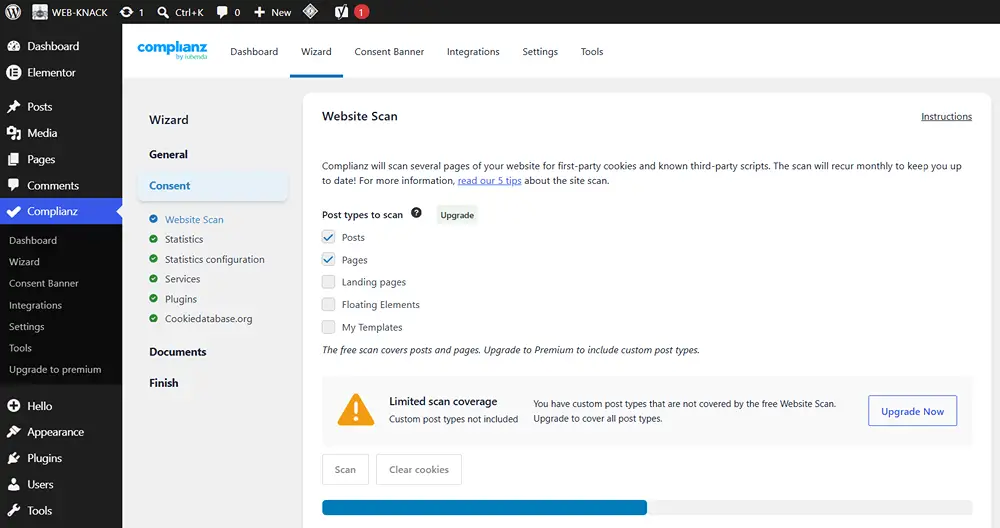
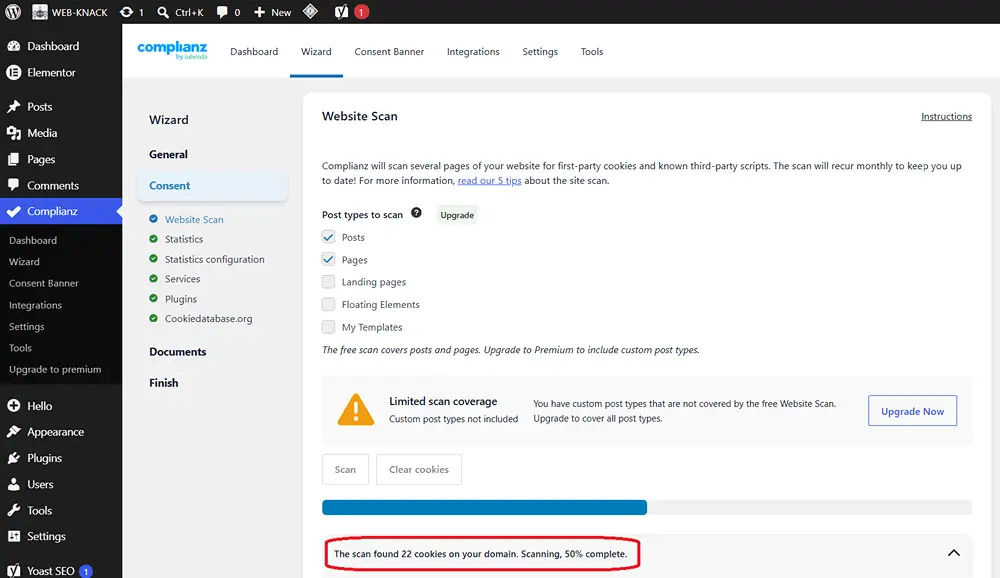
Our Complianz scan eventually reported 22 detected cookies.
But it didn’t complete smoothly.
At one point, the scan remained stuck at 50%.
Refreshing didn’t resolve it.
We checked Complianz’s support settings and found Safe Mode enabled. Disabling it did not immediately clear the stuck scan.
We then checked the scanner/API state. The token appeared active and Website Scan was enabled.
On our installation, temporarily disabling Website Scan changed the stuck state. The interface subsequently returned with a completed progress bar and 22 detected cookies.
We then re-enabled Website Scan.
This is not presented as a universal fix for Complianz scan problems.
It is simply what cleared the state on the installation we tested after refreshing and changing Safe Mode had not.
A detected cookie is not necessarily being set for new visitors
The scan produced another useful lesson.
Detected entries included names such as:
cookielawinfo-checkbox-analytics
cookielawinfo-checkbox-necessary
CookieLawInfoConsent
These related to a previous consent implementation.
Initially, their presence in the scan could suggest that the old system was still active.
But after clearing stored site data and testing in a clean anonymous browser session, those old cookies did not return.
A scanner gives you evidence to investigate.
A historical detection is not automatically proof that every new visitor currently receives that cookie.
Step 4: Review the services your website actually uses
During setup we reviewed services including Google Fonts, reCAPTCHA, Google Maps and YouTube.
This matters because Analytics is only one part of a website’s privacy and consent architecture.
A contact form protected by reCAPTCHA may involve another third-party service.
An embedded YouTube video or Google Map introduces another integration.
Externally loaded fonts are different from locally hosted font files.
Configure the website you actually have, rather than every category a setup wizard happens to display.
Step 5: Configure Google Analytics
Google Analytics gave us something concrete to test.
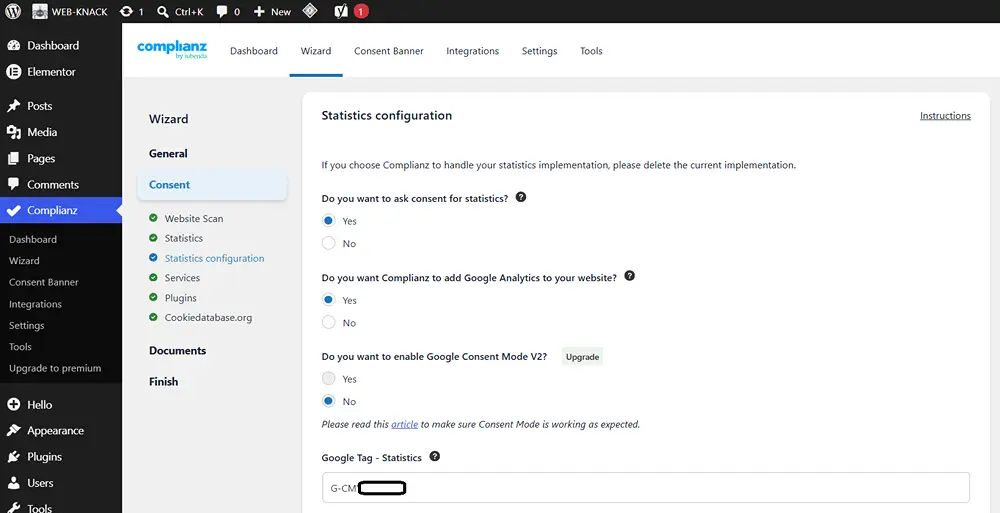
Our final Statistics configuration used:
Statistics – Yes, with Google Analytics
Ask consent for Statistics – Yes
Complianz adds Google Analytics – Yes
We entered the website’s existing G-… GA4 Measurement ID into the Statistics Google Tag field.
We also used:
Google Consent Mode V2 – No
Force script in header – No
Unrelated Marketing and Advertising tag fields were left empty.
We did not create a new Google Analytics property.
The existing GA4 property and its historical information remained in Google Analytics.
We changed how the website loaded GA4, not the Analytics account itself.
Step 6: Configure the banner for an actual choice
Our visitor-facing banner used:
Accept
Deny
View Preferences
We didn’t configure scrolling or a timeout as a substitute for an active choice.
We also kept a way for visitors to manage their preferences again later.
The purpose of the banner isn’t simply to disappear.
It is to explain the website’s approach and provide the controls relevant to that approach.
The problem: GA4 was still appearing before consent
At this point, the setup looked convincing.
The banner existed.
Statistics required a choice.
The blocker was enabled.
So we tested it.
Our first browser session contained old WordPress and consent cookies. That made it unsuitable as evidence of what a first-time visitor would experience.
We cleared the relevant site data and repeated the test in a clean, logged-out browser context.
The old CookieLawInfo cookies disappeared.
But Google Analytics cookies remained.
Before accepting Statistics, we could see:
_ga
_ga_CMYJFKCECM
alongside LiteSpeed’s:
_lscache_vary
That was the evidence we needed.
Something outside the intended Complianz route was still loading Analytics.
Finding the source: Google Tag Manager
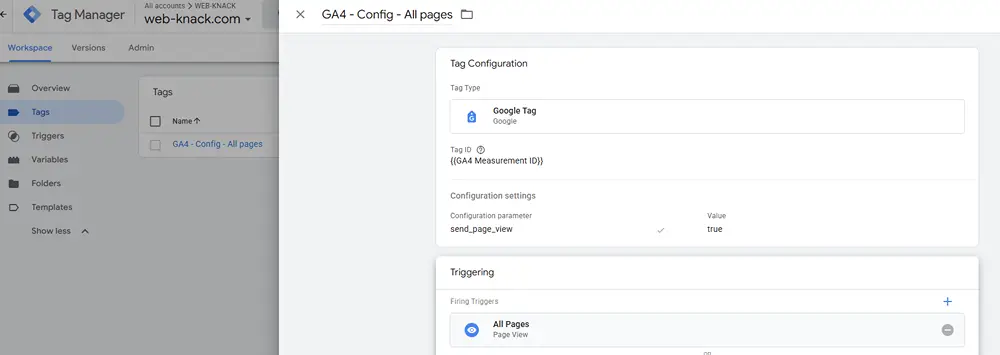
WEB-KNACK already had Google Tag Manager installed.
Inside the container, the relevant GA4 configuration used an:
All Pages
trigger.
So our architecture effectively contained two different routes:
Complianz – visitor’s Statistics choice
and:
GTM – GA4 firing across the site
A consent plugin doesn’t automatically mean every independently installed tag follows the consent architecture you intended.
We initially tried to preserve GTM
Our first attempt was to create a GTM Custom Event trigger for the Complianz Statistics event:
cmplz_event_statistics
and use that instead of the existing All Pages trigger.
Removing All Pages mattered. Adding another trigger without removing the existing route would not necessarily solve the problem.
In Preview/Tag Assistant, GA4 didn’t fire before consent, which looked promising.
But after accepting, we couldn’t reliably verify the expected event and the tag remained unfired.
The test environment was also inconsistent about the Tag Assistant connection.
So we did not publish those GTM workspace changes.
That gave us a useful rule:
Don’t publish a tracking or consent configuration merely because it looks theoretically correct. Verify the behaviour you actually need first.
Why we removed Google Tag Manager
At that point we asked a simpler question.
What else was the GTM container actually doing?
For the WEB-KNACK configuration being tested, it was effectively being used to deploy GA4.
There wasn’t a complex stack of advertising and marketing tags that justified preserving it.
So instead of:
Complianz – GTM – GA4
we used:
Complianz – GA4
This was an architectural decision for one website.
It is not a claim that Google Tag Manager is bad or unnecessary generally.
A website managing advertising tags, conversion tracking, marketing platforms and complex triggers may have very good reasons to retain GTM.
For WEB-KNACK, technical complexity needed a reason to exist. In this case, that extra layer no longer had one.
Step 7: Remove the old GTM installation carefully
Our GTM installation had been inserted through WordPress’s Head & Footer Code area.
The HEAD field contained the standard GTM JavaScript block.
The BODY field contained the corresponding <noscript> iframe.
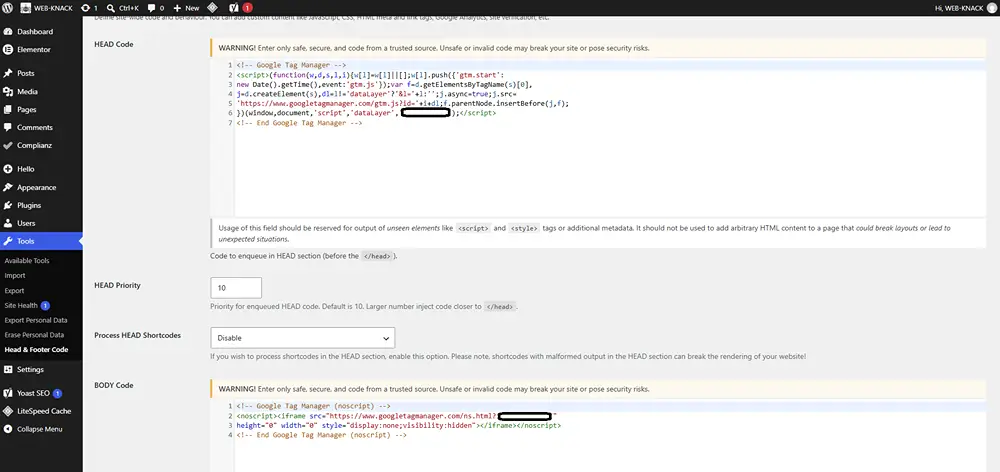
We removed both GTM blocks after configuring Complianz to use the existing GA4 Measurement ID.
We did not delete the Google Analytics account or property.
Removing GTM from a website and deleting Google Analytics are completely different actions.
If a header/footer area contains other scripts, don’t clear the entire field blindly.
Remove only the implementation you have identified and intend to replace.
Step 8: Purge caches before testing
WEB-KNACK uses LiteSpeed Cache, so we purged the site cache after changing the tracking architecture.
Websites using a CDN or host-level caching may have additional layers to clear.
We also opened a fresh anonymous browser context.
Your everyday browser can contain:
- Previous consent decisions.
- Cookies from an older consent plugin.
- Analytics cookies.
- WordPress login cookies.
- Other historical site state.
A clean test removes much of that noise.
Step 9: Test whether GA4 is actually blocked
We opened the website as a fresh, logged-out visitor and used:
Chrome DevTools – Application – Cookies – website domain
We specifically looked for GA4-related cookies such as:
_ga
and:
_ga_*
The property-specific suffix can vary between implementations.
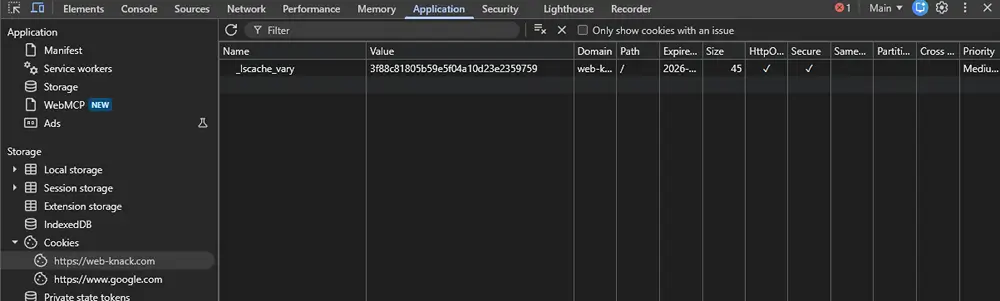
Before consent
Before interacting with the banner, our clean test showed:
_lscache_vary
but no:
_ga
or:
_ga_*
After accepting Statistics
We then accepted the relevant consent.
This time we saw:
_ga
_ga_CMYJFKCECM
and Complianz consent-state cookies, including the Statistics preference.
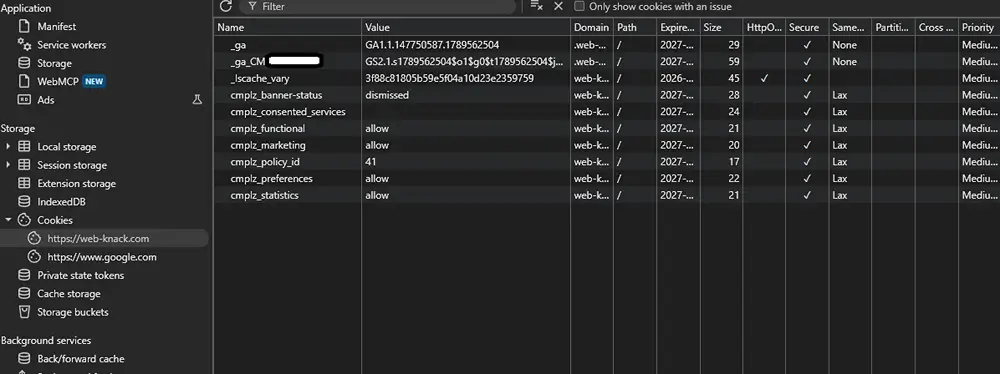
The two screenshots are more useful together than separately.
WEB-KNACK test result - September 2026
In one clean anonymous browser test, the earlier WEB-KNACK implementation created GA4 _ga cookies before the intended Statistics consent because GA4 was still being loaded through the existing GTM configuration. After removing that route and allowing Complianz to manage the direct GA4 implementation, _ga cookies were absent before consent and appeared after Statistics was accepted.
Environment: WordPress, Elementor/Elementor Pro, LiteSpeed Cache, Complianz Free and GA4.
Sample: One website and one tested configuration.
Limitation: This was not a controlled comparison of consent plugins.
This before-and-after result is the most important first-party evidence in this article.
A configuration screen tells us what we asked the software to do. The browser gives us evidence about what actually happened.
What our browser test proves - and what it doesn't
The test demonstrates that GA4 cookies were absent before the relevant interaction and appeared after acceptance in the final WEB-KNACK configuration.
It does not prove every possible fact about every request leaving the browser.
For more complete technical verification, inspect the browser’s Network panel as well as cookie and storage behaviour.
That becomes particularly important when testing technologies capable of cookieless measurement.
Cookie behaviour observed in our test
| Cookie | Associated service | Before Statistics consent | After Statistics accepted |
| _ga | Google Analytics | Absent | Present |
| _ga_CMYJFKCECM | WEB-KNACK GA4 implementation | Absent | Present |
| cmplz_statistics | Complianz | Not present as an accepted Statistics preference | Reflected the Statistics choice |
| Other cmplz_* cookies | Complianz | Depended on consent state | Stored aspects of consent/preferences |
| _lscache_vary | LiteSpeed | Present | Present |
Test period: September 2026.
Sample: One WEB-KNACK website configuration.
The presence of _lscache_vary did not mean Google Analytics was running.
That’s why asking “Does my website have cookies?” is usually too simplistic.
More useful questions are:
What set the cookie?
Why does it exist?
When is it set?
What purpose does it support?
Which consent requirement or PECR exception, where relevant, applies to that purpose?
Step 10: Test Deny as well
A finished implementation shouldn’t be tested only through the Accept path.
Start another genuinely clean session and:
- Load the website.
- Confirm the expected pre-interaction state.
- Click Deny.
- Inspect cookies and storage again.
- Inspect relevant network activity.
- Reload the page.
- Check that the preference is remembered appropriately.
If normal GA4 cookies appear after Deny in an architecture intended to withhold GA4 without Statistics consent, investigate further.
Possible causes include another Analytics plugin, a manually installed Google tag, GTM, theme code, cached output or another integration outside the intended consent mechanism.
Step 11: Test changing preferences
Visitors may also need to change a previous choice.
Test what happens when somebody accepts Statistics and later withdraws that preference.
Check whether future Analytics behaviour changes, what happens to existing cookies, whether the new preference persists after reload and whether the manage-preferences control remains accessible.
Stopping future execution and removing browser storage that already exists are related issues.
Don’t automatically assume they behave identically.
Will Google Analytics still work?
In our configuration, yes – after the relevant Statistics choice has been granted.
GA4 can then send measurement to the existing Google Analytics property.
But the resulting dataset needs to be interpreted correctly.
Under a blocking approach like ours, visitors who decline Statistics are not directly observed in the same way as visitors who accept.
Google’s Advanced Consent Mode behaves differently because consent-aware tags can send cookieless pings while Analytics storage is denied. Google uses those signals for modelling where the relevant requirements are met.
Analytics should therefore not automatically be treated as a perfect census of everybody who visited a website.
You need to understand what your particular measurement configuration represents. If you’re less familiar with what GA4 can tell you about website visitors and behaviour, our guide to Google Analytics for businesses explains the wider role of Analytics.
Does Complianz receive our Google Analytics reports?
Using Complianz to control when our GA4 implementation loads does not mean our Analytics reporting has moved into Complianz.
The roles are different.
Complianz manages the consent interaction and, in our configuration, adds the GA4 implementation to WordPress.
Google Analytics remains the analytics platform receiving and reporting the resulting measurement.
Website owners should still review the current privacy, security and data-processing information for the products they use.
Troubleshooting the most common problems
_ga appears before consent
For an implementation intended to withhold GA4 until Statistics is accepted, finding _ga beforehand is a reason to investigate.
Start with one question:
Where is Google Analytics actually installed?
Possible routes include GTM, an Analytics plugin, theme settings, Elementor Custom Code, a header/footer plugin, manually edited theme files, another marketing plugin or the consent plugin itself.
More than one route can exist at the same time.
Map the implementation before repeatedly changing the banner.
GA4 doesn't work after Accept
Check the Measurement ID belongs to the intended GA4 web stream.
Confirm Statistics was actually accepted.
Then inspect optimisation, caching and security tools that could delay or prevent JavaScript execution.
Use DevTools Network activity and GA4 Realtime as additional signals rather than depending on a single screen.
The banner doesn't appear
Check whether the banner is enabled and whether the browser already has a stored choice.
Also test while logged out, purge relevant caches and check whether JavaScript optimisation or another plugin is interfering.
A preview working inside WordPress doesn’t prove the public website is displaying the same state.
Old cookies keep appearing in the scanner
A scanner detecting an old cookie name doesn’t necessarily mean a new visitor currently receives it.
Clear site data, start a clean anonymous session and see whether the cookie returns.
That’s how we distinguished old CookieLawInfo remnants from the final live behaviour on WEB-KNACK.
Test the website, not merely the banner
Analytics isn’t the only functionality a consent implementation can affect.
Check important pages and journeys involving:
- Contact forms.
- reCAPTCHA.
- YouTube or other video embeds.
- Google Maps.
- Booking systems.
- Marketing integrations.
- Other externally hosted content.
A privacy implementation that silently breaks an important contact form creates another problem.
The goal is a website whose actual behaviour matches the intended configuration.
Does cookie consent affect website performance?
Consent management adds functionality for the browser to load and execute.
That fact alone does not establish which consent product is fastest.
WEB-KNACK did not run a controlled performance benchmark comparing Complianz, Elementor Cookie Consent, CookieYes, Cookiebot or other platforms.
We therefore make no performance ranking.
Our broader technical principle is simpler:
Every plugin, external service, script and technical layer should have a clear reason to exist.
That’s why removing GTM made sense for our website.
Once Complianz could manage the direct GA4 implementation and no other current tags depended on GTM, that additional layer no longer provided enough value for us to retain it.
Another website may reach a completely different conclusion.
Which setup suits different business websites?
There is no single WordPress consent architecture every business should copy.
Simple brochure or lead-generation website
A website using contact forms, straightforward analytics and occasional third-party embeds may be adequately served by a WordPress-focused consent solution with appropriate controls and direct Analytics integration.
Testing is still necessary.
Website using several marketing platforms
A business using Google Ads, Meta advertising, remarketing, call tracking, CRM integrations and multiple conversion tags has a different measurement environment.
A properly designed GTM implementation may be extremely useful.
Removing it simply because WEB-KNACK removed ours would make little sense.
E-commerce
An online shop may use storage for baskets, checkout, account sessions and fraud prevention while separately using analytics, advertising and personalisation.
Those purposes shouldn’t be collapsed into one generic category.
International websites
A business actively serving several jurisdictions may require different regional consent configurations.
Don’t assume a setup designed around one UK business resolves requirements everywhere else.
Analytics relying on the UK statistical purposes exception
A business may decide to investigate whether its analytics implementation satisfies the UK’s statistical purposes exception.
That assessment needs to consider the actual purpose, resulting information, aggregation, third-party involvement and objection mechanism.
The word “analytics” by itself isn’t enough.
What should you check before choosing a WordPress cookie-consent plugin?
Before comparing banner colours or layouts, establish what the website actually contains.
Check the Analytics installation, whether GTM is present, whether advertising pixels are used, which third-party embeds exist, whether forms rely on external services and whether the solution can control the technologies you need it to control.
Then consider how visitors deny or change choices, how the product’s charging model works as usage grows, how it fits the existing WordPress stack and how you’ll verify the implementation afterwards.
Maintainability matters.
Document where Analytics is installed, which tool manages consent and which important third-party services the website depends on.
Key findings for media and sharing
- A visible cookie banner does not prove Analytics is being controlled as intended.
- Duplicate Analytics routes can bypass the consent architecture you expected.
- Clean-browser testing can reveal behaviour that configuration screens cannot.
- GTM can be valuable, but not every GA4 implementation requires it.
- Cookie and network behaviour should be tested after material website changes.
What this means for Essex and UK small businesses
For many small businesses, cookie consent is treated as something to add shortly before a website launches.
But a modern business website is a collection of interconnected systems: analytics, forms, maps, videos, fonts, caching, advertising and other integrations.
Privacy and consent decisions therefore belong within the wider technical architecture. That makes privacy and third-party integrations worth considering when planning what a company website needs before it is built.
For an Essex business commissioning a new website – or any UK company reviewing an existing one – the useful questions go beyond “Which cookie banner will you install?”
Ask which third-party services the website uses, why they’re there, what loads before a visitor makes a choice, who controls Analytics and how the finished configuration will be tested.
For web design in Essex, these foundations are generally easier to address during a structured build than after years of tracking snippets, plugins and integrations have accumulated.
Location doesn’t change the basic technical principle.
Whether a business is in Essex or elsewhere in the UK, the website’s actual technologies and purposes matter more than the appearance of the consent banner.
What this means if you're improving an existing website
An untidy consent setup doesn’t automatically mean you need a complete website rebuild.
Start by mapping what exists.
An established website may have been changed by several agencies, freelancers, marketing teams and staff members over the years.
That can leave old tracking snippets, duplicate Analytics installations, unused GTM containers, redundant plugins, legacy consent cookies and abandoned marketing integrations.
Identify what each component does before adding another tool.
For WEB-KNACK, GTM no longer provided enough value to retain it solely as a route to GA4.
Another website could reasonably reach the opposite conclusion.
The objective isn’t to remove technology for the sake of having fewer tools.
It’s to create a website whose technical components have clear purposes and can be understood, tested and maintained.
For businesses reviewing an existing website, our web development services in Essex cover technical website improvements alongside broader development requirements.
Cookie consent is not a one-time job
Websites change.
A new plugin can introduce another service. A marketing agency can add a pixel. A booking system can be embedded. Analytics can be reconfigured.
Regulatory guidance changes too, as the UK’s 2026 changes demonstrate.
Recheck the implementation after material changes to analytics, advertising, embedded content, consent-management platforms, themes, plugins or optimisation settings.
For this WEB-KNACK article, the planned review point is March 2027, or earlier following a material change to relevant ICO guidance, Google Analytics or Consent Mode, Elementor Cookie Consent or Complianz.
Keep evidence of what you tested
One useful outcome from our implementation was having evidence of the change.
We had the earlier Analytics-cookie result, the GTM configuration, the final Complianz settings and the clean before-and-after browser test.
A basic implementation record can document the date tested, relevant plugin versions, consent configuration, Analytics architecture, important third-party services and the results of the Before, Deny and Accept tests.
It doesn’t need to become a huge compliance document.
It needs to give you a reliable baseline when the website changes later.
Final WordPress cookie-consent testing checklist
Before considering the implementation finished:
- Identify the storage technologies and third-party services in use.
- Understand why each important technology is present.
- Check the current UK position rather than relying on an old cookie tutorial.
- Identify exactly where Analytics is installed.
- Check for duplicate GA4, GTM or other tracking implementations.
- Test as a clean, logged-out visitor before interacting with the banner.
- Test both Accept and Deny.
- Test granular preferences where used.
- Inspect cookies, storage and relevant network activity.
- Test forms, videos, maps and other important embeds.
- Change a previous preference and test again.
- Purge relevant caches before relying on the result.
- Document the final configuration and test date.
- Retest after material technical or regulatory changes.
If several of those answers are missing, the implementation probably isn’t finished simply because the banner is visible.
Conclusion
A WordPress cookie banner is only the visible part of a wider technical implementation.
On WEB-KNACK, browser testing exposed a GA4 route that was still creating Analytics cookies before the intended Statistics consent. Removing that duplicate route and simplifying the architecture produced a clear before-and-after result in our September 2026 test.
That doesn’t make our configuration the universal answer for every business.
The useful lesson is simpler: understand what your website loads, remove unnecessary duplication and verify the result as a real visitor would.
Then test it again when the website, measurement stack or relevant guidance materially changes.
Sources and further reading
Information Commissioner’s Office
Guidance on the use of storage and access technologies
How do we manage consent in practice?
Elementor
Understanding cookie scanning and scan reports
WEB-KNACK first-party evidence
Implementation and browser testing carried out on the WEB-KNACK website in September 2026.
Research and implementation tested: September 2026
UK regulatory guidance checked: September 2026
Product information checked: September 2026
Planned review: March 2027, or earlier following a material change